Español
OnlyFans Tip Menu Ideas With Examples | A Comprehensive Guide
Maximizing your income on OnlyFans isn’t just about posting content—it’s about engaging your audience and giving them compelling reasons to tip. A well-structured tip menu serves as a powerful tool to encourage fans to spend more, interact with you, and enjoy exclusive perks.
This guide will walk you through everything you need to know about creating an effective OnlyFans tip menu, including:
✅ What a tip menu is and why it’s important
✅ How to create an engaging and profitable tip menu
✅ Pricing strategies and real-world examples
✅ Creative tip menu ideas tailored for different niches
✅ Best ways to promote your tip menu to increase earnings
✅ How to use CreatorTraffic.com to grow your OnlyFans subscriber base and boost engagement

What Is an OnlyFans Tip Menu & Why Do You Need One?
A tip menu is essentially a price list for specific services, custom content, or interactions that your subscribers can purchase by tipping a set amount. It creates an easy way for fans to support you financially while also making their experience more interactive and engaging.
Why Is a Tip Menu Important?
✔️ Encourages Tipping – When fans see clear options, they’re more likely to tip instead of just browsing.
✔️ Increases Revenue – You earn extra income beyond your subscription fees.
✔️ Organizes Requests – A tip menu sets boundaries and prevents endless custom requests.
✔️ Boosts Fan Engagement – Fans love interactive experiences and exclusive content.
A tip menu transforms your OnlyFans page into a more professional, well-structured business. Instead of random tips, subscribers now have clear, enticing options that make it easy and fun to spend money on your content.
How to Create an Engaging Tip Menu
A successful tip menu is clear, enticing, and profitable. Here’s how to create one that works:
1. Keep It Clear & Easy to Read
Don’t overload your tip menu with too many options or complicated wording. Make it straightforward with simple descriptions and organized pricing so fans can easily see what they’re getting.
👉 Example: Instead of writing “Exclusive customized 3-minute video featuring outfit of your choice in a style you prefer”, say:
📹 Custom 3-minute video (outfit of your choice) – $50
2. Offer a Range of Prices
Not all subscribers have the same budget. Offering low, mid, and high-tier options ensures that everyone can participate, increasing your overall earnings.
💰 Low-Tier ($5 - $20) – Small, quick interactions (e.g., shoutouts, selfies).
💎 Mid-Tier ($25 - $75) – Personalized content, special requests.
🔥 High-Tier ($100 - $500+) – Exclusive experiences, premium content.
3. Personalization = More Tips
People love exclusive, one-on-one interactions. Offering customized content can make subscribers feel special, encouraging them to spend more.
💡 Example:
🎙️ Personalized voice message (with your name & a custom message) – $20
📩 "Good morning" & "Good night" messages for a week – $75
4. Make It Visually Appealing
Your tip menu should be easy to read and aesthetically pleasing. Use:
📌 Canva or Photoshop to create a visually appealing menu
📌 Pinned posts on OnlyFans to keep your menu visible
📌 Story highlights or captions to regularly promote it
5. Use Fun, Themed Menus
You can create different seasonal or niche-based menus to keep things fresh and engaging.
🎃 Halloween Tip Menu – Spooky-themed videos, costumes, etc.
🎄 Christmas Special – Naughty or nice content packages.
📸 Boudoir Theme – Exclusive lingerie or softcore photoshoots.
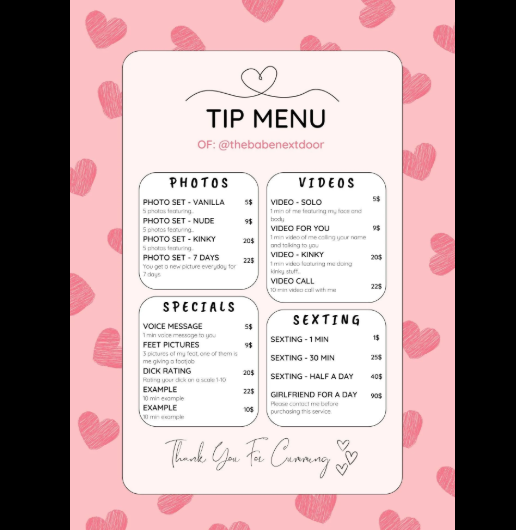
OnlyFans Tip Menu Ideas With Examples
Now that you know how to structure your menu, here are some great ideas to include:
Basic Engagement & Fun Interactions
- 💌 Shoutout in my feed – $5
- 🎙️ Personal voice note – $10
- 📸 Selfie just for you – $15
- 💬 DM reply priority for a week – $20
Photo & Video Content
- 📷 Exclusive lingerie photo set (5 pics) – $25
- 🎥 Custom 30-second video message – $35
- 💃 Dancing video (1 min) – $50
- 🔥 Custom themed photoshoot (specific outfit/pose) – $75
Custom & Interactive Requests
- 📝 Name mention in a post – $30
- 👠 Feet pics (3 angles) – $40
- 🕺 Custom slow-motion video – $60
- 📩 "Good morning" & "Good night" messages for a week – $75
Premium & High-Tier Services
- 🎭 Cosplay-themed video – $100
- 💋 Personalized ASMR voice message – $150
- 🔥 Live 10-minute chat – $200
- 🎁 Exclusive behind-the-scenes content – $300+
How to Promote Your Tip Menu & Gain More Subscribers
To maximize engagement:
✅ Pin your tip menu on your OnlyFans page
✅ Mention it in your welcome message to new subscribers
✅ Use call-to-actions in your posts (e.g., “Tip $20 for a surprise”)
✅ Offer limited-time specials to encourage quick tipping

Boost Your OnlyFans Traffic with CreatorTraffic.com
No matter how good your content is, you need traffic to get more subscribers and maximize earnings.
CreatorTraffic.com is a fantastic tool for:
🚀 Driving targeted traffic to your OnlyFans page
👥 Increasing subscribers & engagement
🔝 Boosting visibility through SEO and promotions
Many successful OnlyFans creators use CreatorTraffic.com to grow their audience. Investing in promotion is essential, and this platform makes it easier to get your page in front of the right audience.
Final Thoughts
A tip menu can significantly increase your OnlyFans earnings and maintain fan engagement. Customize your offerings, experiment with pricing, and make tipping fun and rewarding for your audience.
And remember—promotion is key! Use CreatorTraffic.com to get more eyes on your page and grow your fan base faster.
Would you like help designing a custom tip menu? Let me know in the comments! 😊